Getting started
Getting started
This page covers how to think in pattapatta, how imports work, and a small end-to-end plotter pipeline.
Mental model
- Build or load geometry as
Path/Groupvalues. - Operate on regions (boolean, transform, buffer, …) — see Operations.
- Fill with stroke marks (hatch, pack, tile, …) — see Fills.
- Emit SVG with
toSvg(fill="none", stroked marks).
Solid area fills are out of scope. See Pen-plotter output.
Imports
Root import (convenient):
import { polygon, vec2, union, toSvg } from 'pattapatta'Feature subpaths (tree-shake friendly):
import { hatchParallel } from 'pattapatta/hatch'
import { hexLatticePack } from 'pattapatta/circlePacking'
import { buffer } from 'pattapatta/morphology'
Geometry in 30 seconds
import { vec2, polygon, group, createCircle } from 'pattapatta'

const square = polygon([
  vec2(0, 0),
  vec2(1, 0),
  vec2(1, 1),
  vec2(0, 1),
])

const disk = createCircle(0.5, 0.5, 0.4, 48)
const scene = group([square, disk])
Read Geometry model for Path, holes, and Group z-order.
Mini pipeline: cut → hatch → pack
import {
  createRect,
  subtract,
  hatchParallel,
  segmentsToOpenPaths,
  maximumInscribedPack,
  group,
  toSvg,
  polyline,
} from 'pattapatta'

const paper = createRect(0, 0, 100, 100)
const hole = createRect(30, 30, 40, 40)
const frame = subtract(paper, hole) // Group

const target = frame.paths[0]!
const hatches = segmentsToOpenPaths(
  hatchParallel(target, { spacing: 4, angle: Math.PI / 6 }),
)
const packs = maximumInscribedPack(target, 5, 0.5)

// Circles → open rings for SVG (or emit <circle> yourself)
const circlePaths = packs.map((c) => {
  const n = 32
  const pts = Array.from({ length: n }, (_, i) => {
    const t = (i / n) * Math.PI * 2
    return { x: c.x + Math.cos(t) * c.r, y: c.y + Math.sin(t) * c.r }
  })
  return { rings: [pts], closed: true }
})

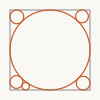
const out = toSvg(group([...hatches, ...circlePaths]), {
  viewBox: '0 0 100 100',
  strokeWidth: 0.8,
})
More chained recipes (union → hatch, star cut → cross hatch, ring → hatch, …) live on Examples. Try them interactively under Live demos.
Coordinates
There is no fixed unit. Use plotter millimetres, pixels, or normalized [0,1] — just keep strokeWidth consistent with your scale.
TypeScript
The package ships .d.ts next to ESM. No extra @types package is required for the public API (d3-delaunay types are a dependency of the build).
Regenerating doc pictures
Example SVGs in this book are produced by:
pnpm docs:examplesThat writes into website/static/assets/.
Next
Browse the API reference — each module page includes pictured examples.